Wednesday, June 7, 2017

"Digital Citizenship and Safety Course" by Google

Google released a training course on "Digital Citizenship and Safety Course".

This online course is designed for teachers to learn how they can help create a safe and positive experience online. You’ll learn how to integrate Digital Citizenship and Safety activities in your classroom by reading, watching videos, and doing activities.
Nowadays, people spend a lot of time online, it is important to teach students how to stay safe on the web.

There are 6 units in the course. In every unit, there is quiz thus you can check your learning from that particular unit.

Saturday, June 3, 2017

"Google Sheets" Updates


"Explore" in Sheets, powered by machine learning, helps teams gain insights from data, instantly. Simply ask questions—in words, not formulas—to quickly analyze your data. For example, you can ask “what is the distribution of products sold?” or “what are average sales on Sundays?” and Explore will help you find the answers. 


Now, it can be done with Explore

Wednesday, May 31, 2017

Hangout video calls from Google Calendar

Hangout from Google Calendar

Step-1:
  • Go to Google Calendar.
  • Create a "Calendar event" on the basis of date and time you want to make a Hangout Video Call.
  • Click on “Edit event”.

Monday, May 29, 2017

Comment Count by "Google Slides"

Google Slides: "Comment Count"

With Google Slides, you can create, edit, collaborate and present wherever you are. For free. For teachers, it is very easy to check their students' collaboration within Google Slides and giving constructive feedback to them to make their work much more effective.

Sunday, May 28, 2017

New Google Sites - Duplicate Page

New Google Sites- Duplicate Page


Now make copies of pages using the Duplicate page feature available on the page three-dot more actions menu. This means you can create pages and use them as page templates.
Now it is possible to make copies of pages using the "Duplicate Page" feature in the New Google Sites.

Saturday, May 27, 2017

AutoDraw by Google Creative Lab

AutoDraw
“Fast Drawing for Everyone”

AutoDraw is a new kind of a free, web-based drawing tool. It pairs machine learning with drawings from talented artists to help everyone create anything visual, fast. Built by Dan Motzenbecker and Kyle Phillips with friends at Google Creative Lab.

Tuesday, May 23, 2017

Workshop on "Technology for Education"


Workshop on "Technology for Education"


The program will be conducted by Prof. Dr. Yousuf Mahbubul Islam, Vice Chancellor of DIU and Google Certified Educators, Bangladesh.

Participants will be able to-
·  Integrate technology for learning & teaching
·  Get chance to explore smart technology
·  Learn how to become a partner with Google for education.

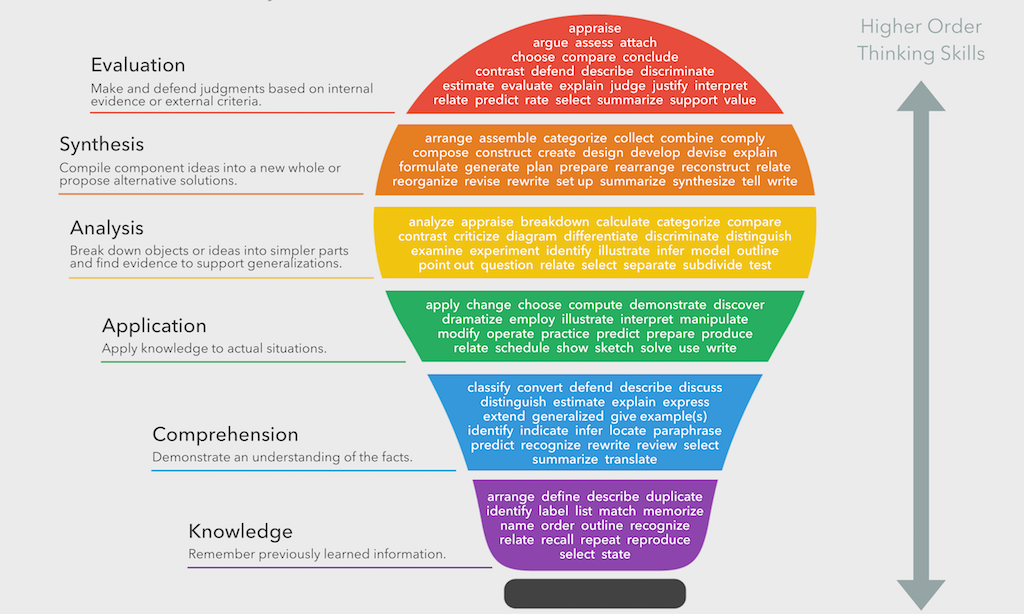
What Is Bloom’s Taxonomy? A Definition For Teachers

image attribution fractus learning What Is Bloom’s Taxonomy? A Definition For Teachers In one sentence, Bloom’s Taxonomy is a h...